 PROREY TECH
PROREY TECH
by Andrey Pronyaev prorey.com
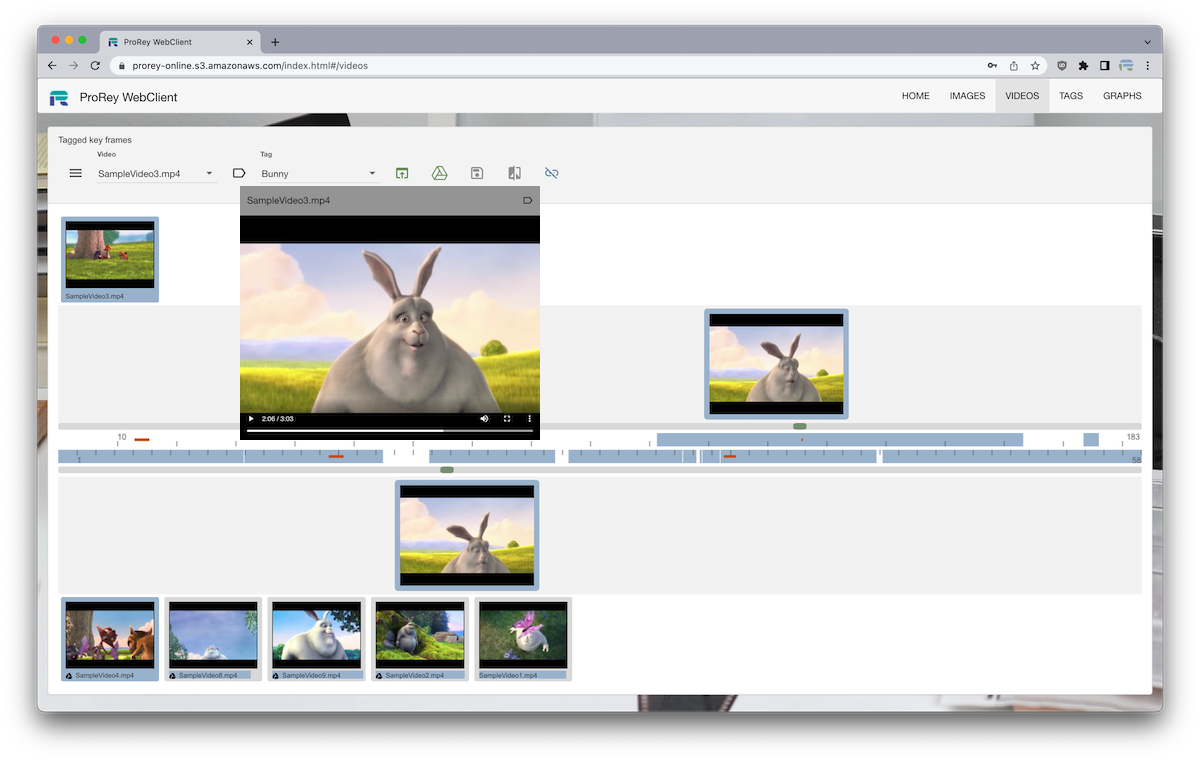
ProRey TagCat prorey.online is Online Application for Image and Video tagging and comparison. User can select Image and Video files from local storage, and compare them to each other. File metadata can be saved in a cloud collection for later comparison. Images and Video frames can be tagged and links between them can be analyzed with graph visualizations.
ProRey TagCat generates Image and Video dHashes locally without uploading media files to cloud server. This makes dHashes comparison on cloud fast, private and secure. dHashes are stored and matched in graph database which makes storage horizontally scalable. Search time is dependent only on number of images or video frames in collection.
ProRey TagCat is developed with a modern serverless cloud stack. New features can be added rapidly with JavaScript-based languages and cloud infrastructure cost is proportional to number of hashes stored. All modern browsers are supported.
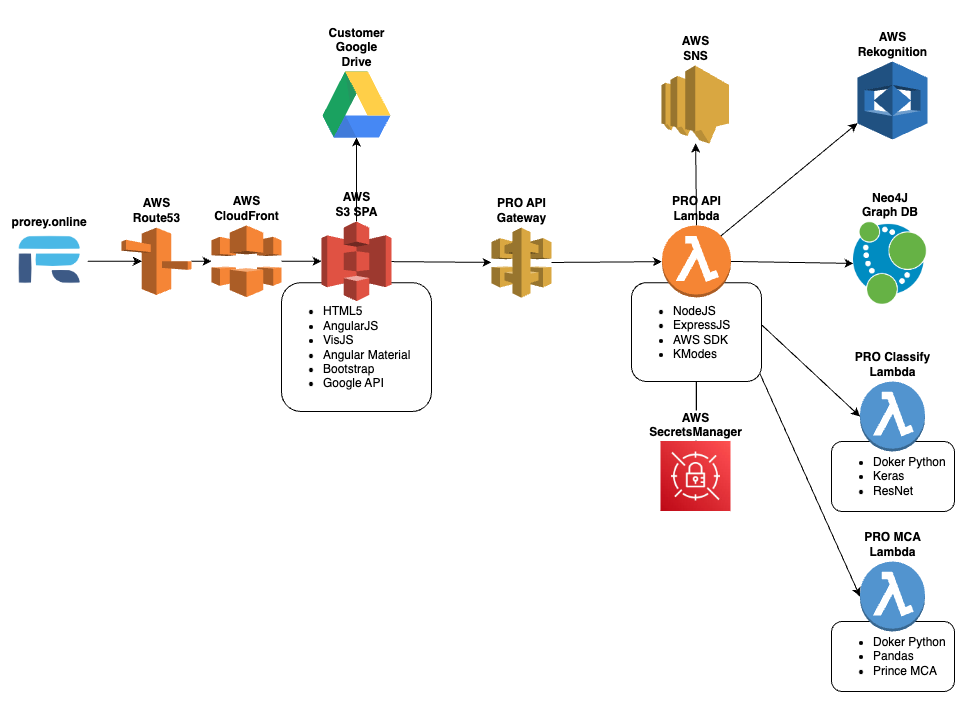
NodeJS is a JavaScript back-end runtime used to authenticate client requests and interact with database.
ExpressJS is a minimal and flexible Node.js web application framework.
React is the JavaScript UI library used for the current ProRey TagCat front-end.
Neo4J AuraDB graph database provides:
VisJS is used to visualize graph data in app
visjs.github.io/vis-network/examples
Bootstrap UI Webpage hosted on AWS CloudFront/S3
Single Page Application hosted on AWS CloudFront/S3
SPA routing is handled in React with a Vite-built entry page, shared route shell, and feature views for Home, Images, Videos, Tags, and Graphs.
<div id="root"></div>


ReactDOM.createRoot(document.getElementById('root')).render(
    <React.StrictMode>
        <App />
    </React.StrictMode>
);
The current UI is built from React feature components, shared modal patterns, route navigation, and reusable media widgets.
Image and video data can be loaded offscreen in a browser to be hashed without leaving users device.
function getImageData(img, width, height) {
    var canv = document.createElement('canvas');
    canv.width = width;
    canv.height = height;
    var ctx = canv.getContext('2d');
    ctx.drawImage(img, 0, 0, width, height);
    return ctx.getImageData(0, 0, width, height);
}
Implement dHash and hamming functions in javascript
dHash calculation:
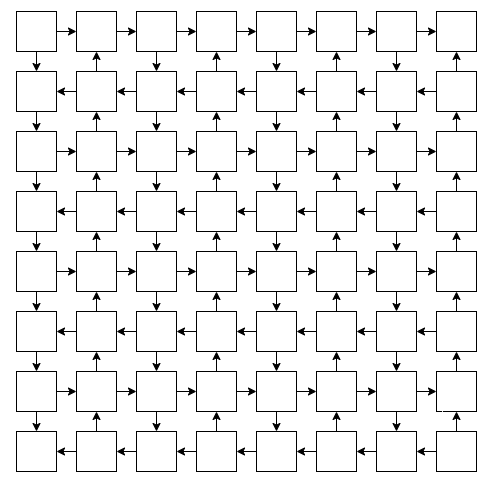
Hamming distance between two integers is the number of positions at which the corresponding bits are different
dHash1 = (1,0,1,0,0,0,1,1,1,0,1)
dHash2 = (0,0,1,1,0,1,1,1,0,0,0)
hamming = 1+0+0+1+0+1+0+0+1+0+1 = 5


function hamming(x, y) {
    return (x ^ y).toString(2).split('1').length - 1;
}
Neo4J provides apoc.text.hammingDistance() method
Video key frames are calculated by comparing subsequent frames to each other at 25FPS till hamming distance exceeds a variance parameter.
Images and Video key frames are compared to each other and are considered visually similar when hamming distance is below variance parameter.
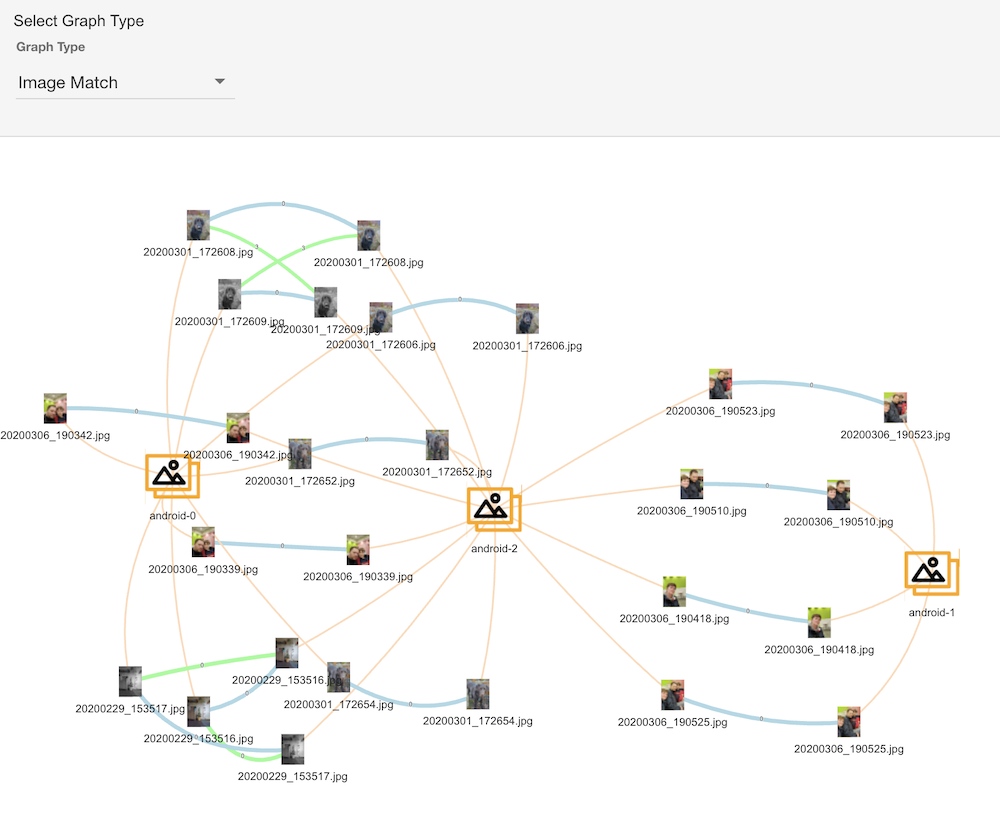
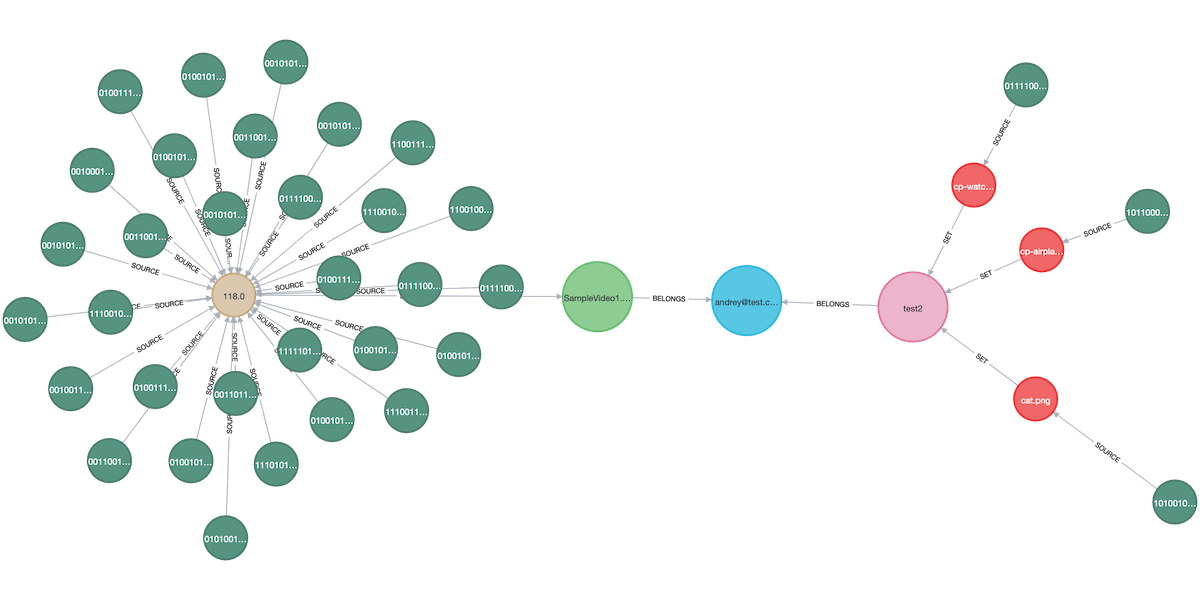
Use VisJS library to visualize Image matches. Line thickness indicates Hamming distance.
Use IndexedDB API to store File object which user saved
developer.mozilla.org/en-US/docs/Web/API/IndexedDB_API
Local files are marked with ⧈ symbol
Store Platform/Browser information from window.navigator.userAgent for image/video files to track their source eg Macintosh: Chrome
NodeJS/ExpressJS server is deployed to AWS Lambda and served via AWS ApiGateway with the use of aws-serverless-express
npmjs.com/package/aws-serverless-express
router.post('/createUser', (req, res) => {
    sendNewUserSNS('name: ' + req.body.name);
    getSecrets(() => {
        neo4jSession
            .run(CREATE_USER, req.body)
            .then((result) => {
                res.send(jsonify(result));
            })
            .catch((err) => {
                console.error('user: ' + err);
            });
    });
});
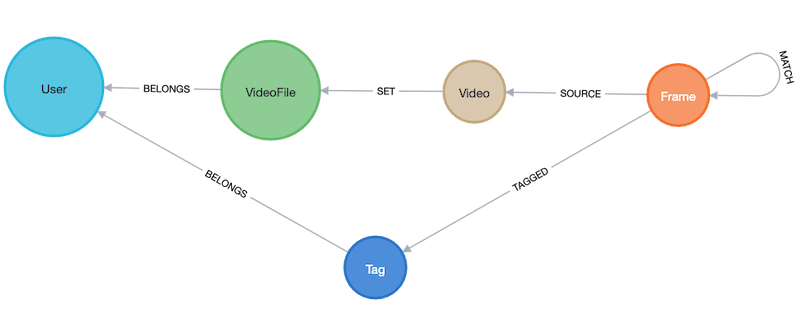
Videos schema
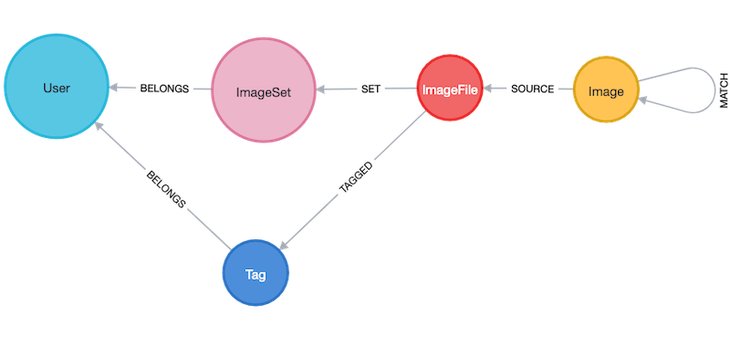
Images schema
Graph example
const CREATE_MATCHES_FRAME = `
    MATCH (frm:Frame{pos:$pos})-[:SOURCE]-(vidFrm:Video{md5:$md5})-[:SET]-(:VideoFile)-[:BELONGS]-(usr:User{name:$username})
    MATCH (src:Frame)-[:SOURCE]-(vidSrc:Video)-[:SET]-(:VideoFile)-[:BELONGS]-(usr)
    WITH frm, src, apoc.text.hammingDistance(frm.dhash, src.dhash) AS dist
    WHERE frm <> src AND vidFrm <> vidSrc AND dist <= usr.vart
    MERGE (frm)-[:MATCH{dist:dist}]-(src)`;
Just like in relational databases, transactions could be utilized to prepare and store bulk data. All video key frames are uploaded to graph database and matched.
Create frame matches operation is committed as a single transaction.
function createFrameMatches(req, res) {
    var vid = req.body;
    var transaction = session.beginTransaction();
    var runs = [];
    vid.frames.forEach(function (frame) {
        runs.push(
            transaction
                .run(CREATE_MATCHES_FRAME, {
                    username: vid.username,
                    md5: vid.md5,
                    pos: frame.pos
                })
        );
    });

    Promise.all(runs)
        .then(function () {
            transaction.commit()
                .then(function () {
                    res.send('done');
                })
                .catch(function (err) {
                    console.error('createMatchesf.transaction.commit: ' + err);
                });
        })
        .catch(function (err) {
            transaction.rollback();
            console.error('createMatchesf.transaction.run: ' + err);
        });
}
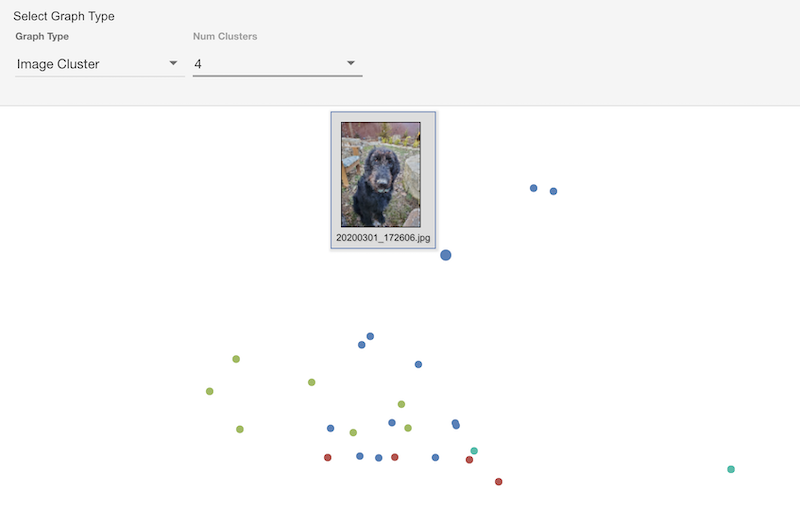
Use UMAP to project dHashes to 2D plot
def lambda_handler(event, _):
    df = pd.read_csv(StringIO(event), header=None, index_col=0)
    dataset = df[1].apply(lambda dhash: pd.Series(list(dhash))).astype(int)
    embedding = umap.UMAP(
        metric="hamming",
        n_components=2,
        random_state=42
    )
    row_coordinates = pd.DataFrame(
        embedding.fit_transform(dataset),
        index=df.index
    ).to_csv(header=None)
    return row_coordinates
Use HDBSCAN ML algorithm to assign clusters based on dHash hamming distances
let vectors = [];
records.forEach((record, idx) => {
    let img = Array.from(record.toObject().source.properties.dhash);
    img.push(idx);
    vectors.push(img);
});
const result = hdbscan(vectors);
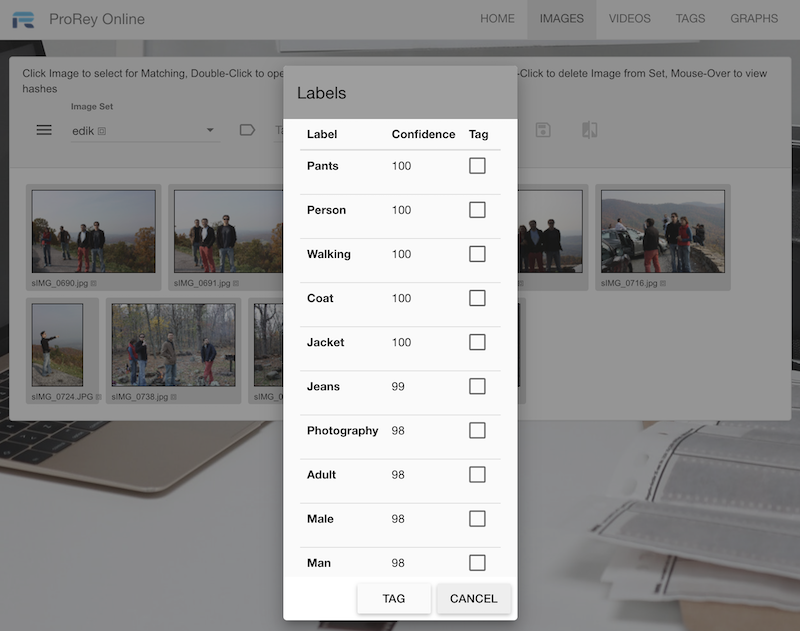
Use AWS Rekognition SDK
function getLabels(req, res) {
    let img = req.body.thumb.replace(/^data:image\/(png|jpeg|jpg);base64,/, '');
    const params = {
        Image: {
            Bytes: new Buffer.from(img, 'base64')
        },
        MaxLabels: 10
    }
    new AWS.Rekognition().detectLabels(params, function (err, response) {
        if (err) {
            console.log(err, err.stack);
        } else {
            res.send(response);
        }
    });
}
Use AWS Lambda with Docker Keras ResNet
model = ResNet152V2(weights="imagenet")

def lambda_handler(event, context):
    decoded_image = base64.b64decode(event["thumb"])
    img = Image.open(BytesIO(decoded_image))
    img = img.resize((224, 224)).convert("RGB")

    x = np.array(img)
    x = np.expand_dims(x, axis=0)
    x = preprocess_input(x)

    preds = model.predict(x)
    predictions = decode_predictions(preds, top=10)[0]
    return json.loads(json.dumps(predictions, default=str))
BitBucket integrates well with Jira, both are Atlassian products
Deploy AWS API Gateway, Lambda, Permissions and IAM with AWS Cloud Formation
aws cloudformation deploy
Synch S3 web page code with AWS CLI
aws s3 sync public
npm run build
// emits public/index.html and public/assets/*
github.com/auth0/node-jsonwebtoken
aws.amazon.com/secrets-manager
const secretsManager = new AWS.SecretsManager({ region: 'us-east-1' });
secretsManager.getSecretValue({ SecretId: 'proreySecret' }, (err, data) => {
    proreySecret = JSON.parse(data.SecretString);
});